
XML Feed

Service Level Agreement Policy Template
with Sample Metrics

Download Instructions Shipped immediately via E-MAIL

IT Service Management  requires Service Level Agreements (SLA) and many organizations do not have a good place to start.  It is now widely accepted that service provision and receipt should be governed by an agreement. This is essential to define the parameters of the service, for the benefit of both the provider and the recipient.  This template is a working SLA with METRICS that over twenty world class enterprise use.

The Service Level Agreement Policy Template with Metrics is designed to make creation of service level agreements far more straight forward. It is intended to de-mystify the SLA, and enable you to produce a top quality document with the minimum of fuss. There is absolutely no need to re-invent the wheel! It is supplied in MS-Word format (Versions 2003 and 2007) plus supporting materials in PDF format and Excel (version 2003 and 227).  Include are:

  • Service Level Agreement Policy Template  is a nine page policy for a single application,  It defines specific SLAs and metrics that are both internally and externally focused.

  • 70 possible metrics presented graphically in PDF format.

  • Full Job Description for  the Director of IT Management and Control

The table of contents for the policy template is as follows.

Service Level Agreement For The Application
   Overview
   Three-Tier Environment
   SLA
     Internal IT SLAs
         Hardware/Network Maintenance
         Backup and Recover
         Application Administration
         Application Updates
     External SLA
          IT Obligations
          End User Obligations
     Sample Metrics

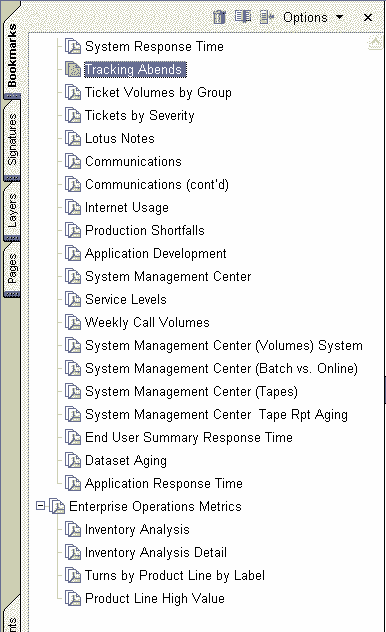
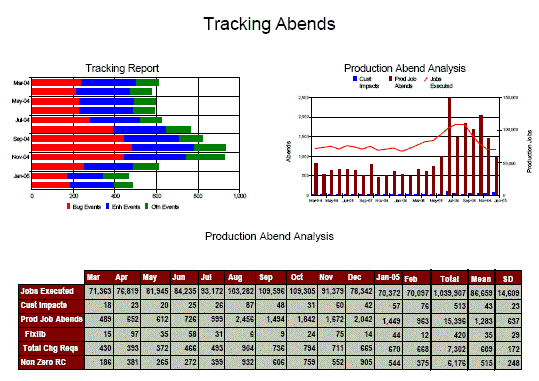
The sample metrics are provided in PDF format.  Click on the small image below to see one page of the PDF file with the bookmarked outline of the document showing the classification of the 70 metrics depicted graphically.


Service Level Agreements Blog Comments

April 16th, 2009

CIO Strategic Planning Guidelines

CIOs now are starting to develop new information technology strategies.  As they do that, they need to include understanding the fundamental business and operational trends that are driving businesses and enterprises of all types to redesign their operations.  The principles that CIOs need to keep in mind are:

  • Flexibility - CIOs must be able to respond to opportunities and challenges faster than ever before. These CIOs are usually battling well-resourced organizations that may be based where the opportunity originated, or another globalizing company that is reaching out for new opportunities. In order to compete, a CIO must create a strategy this helps the enterprise to deliver faster a product or service as good, or better, than that of potentially any other company in the world.
  • Simplicity - The increase in technology has led to increased complexity. While per unit costs of technology are decreasing, in aggregate IT budgets continue to increase. With the pressure on IT to act less as a cost center and more as a way to increase the profitability of business units, adding more storage, more bandwidth, or additional technologies throughout the organization is no longer an acceptable approach to managing information technology. Instead, smart CIOs are investigating technologies like continuous data protection, virtualization, and wireless connectivity to help IT slim down its footprint while increasing their business's competitive advantages. Therefore, the IT team is typically in a difficult position, assessing where to cut costs while still moving forward with a plan to continually enhance IT services to the business.
  • Security and Mandated Requirements - With the growing importance of applications and data, the sources of threats to enterprise data have multiplied dramatically. Everything from natural disasters, to criminals, and corrupt sources within the company can steal or corrupt data. While CIOs do everything that they can to stop these threats in the first place, they still must be prepared to recover from these threats as quickly as possible.
  • Disaster Recovery Business Continuity - As businesses have expanded, the need for anytime, anywhere application access has become a requirement. At the same time, "follow the sun" (global 24/7) operations have shrinking maintenance windows and a need for applications to be running at all times. Delay or loss of data for any reason - system failure, natural disasters - has a domino-like effect across the entire organization, at any time of the day or night.


April 5th, 2009

SPAM a Productivity Killer

Spam now accounts for as much as 80-90% of an organization's total e-mail volume. Every day, organizations face potential communications, operations, and intellectual-property disruption from spam and other e-mail borne threats. As a result, different types of attacks have started to merge and pose severe threats to your organization, leading to a significant increase in e-mail related costs. For companies grappling with limited IT staff, outsourcing e-mail security to one of the growing number of service providers is a quick, no-fuss way of protecting internal e-mail systems.


April 1st, 2009

Added Security Risks

It used to be relatively easy to secure a corporate network. It was a physically connected entity used only by internal users. Web browsing was not generally available at the desktop, and data was transferred only by removable media or email.

Today, networks as we once understood them are disappearing as the network perimeter has become blurred by the prevalence of new technologies and business practices. Instant Messaging (IM), Voice Over IP (VoIP), peer-to-peer (P2P) file-sharing software, and wireless and mobile devices all offer new ways of transferring data. Network access is given to remote workers, business partners and contractors.

These changes fulfill the real business need to remain competitive, but they also increase the risk of malware, other security threats , and data breach threats infecting the network via unsecured hardware and unmonitored communication channels.

  • Security in this more complex environment requires:
  • Securing more types of endpoint devices
  • Securing endpoint computers
  • Monitoring for compliance with security policies
  • Protecting network from fast-moving zero-day threats


March 24th, 2009

The Market that Micosoft Missed

Before Bill Gates left Microsoft, he realized that Enterprise Search was becoming increasingly important to organizations, and a central component of their business strategy. Competitors such as Google had moved quickly to fill the gaps left by Microsoft. With increasing competition and customer demand, Microsoft publicly announced in 2007 that Enterprise Search was strategic to them and began developing a unified search strategy, rationalizing the disparate portfolio of search products they owned.

Now Microsoft is moving to fill that gap.  The question is will they succeed?


March 17th, 2009

Who Should Have a Formal Security Policy?
Regardless of the size of your company, you should have an IT security policy in place. Even if you have not put one in writing yet, you have a policy already. In most small companies the policy is an island approach where every individual is left to his or her own devices and while this has worked well in the past, it must change in the future. In the past, with the exception of burning down your offices, damage from a single employeeÂ’s actions would usually be limited to their own files and sphere of influence. Today, the actions of one can affect your entire IT structure and wreak havoc and even destruction or disclosure of your data. Running your business without a policy in place is akin to setting sail in a boat with no rudder. The winds may carry you safely somewhere, or smash you into the rocks at any time. At a minimum the security policy should act as a guide for your business. If you have more than one employee, you should have a policy in place. For companies with up to 200 employees, the Janco Security Manual Template  allows management to have a better awareness of IT security and for larger organizations, the standards should allow the creation of a mature and compatible IT security culture within the company.  


March 3rd, 2009

Data Breaches Result in Law Suits

(ComputerWorld) - Security - Data BreachesIn an indication of the legal troubles that companies can find themselves in over data breaches these days, several banks and credit unions have begun suing Heartland Payment Systems Inc. over its recently disclosed data breach.

In the six weeks since the potentially massive breach was disclosed, eight banks and credit unions have filed lawsuits against Heartland over its alleged failure to take adequate measures for protecting credit and debt cardholder data.

Heartland said on Jan. 20 that unknown intruders had broken into its network sometime last year and accessed payment card data belonging to an undisclosed number of customers. The breach, thought to possibly be the biggest ever disclosed, has already affected over 500 financial institutions, including a handful in the Bahamas, Bermuda and Canada.

The lawsuits seek compensation from Heartland for the costs that the financial institutions said they've had to bear in notifying affected customers about the breach and in reissuing new payment cards. The lawsuits also claim damages from Heartland for costs of the alleged fraud that the banks claimed have resulted from the breach.


February 21st, 2009

Compliance Management
Compliance ManagementRegulatory requirements have made log management & analysis one of the two fastest growing areas of security. In fact, nearly every major regulation affecting cyber security now demands or implies the need for continuous logging and effective log management HIPAA, SOX, ISO 27001, COBIT. Even the Payment Card Industry (PCI) standard appears to demand it. And regulations governing information security technology are evolving as fast as the technology itself.  


February 8th, 2009

Economic Downturn Impacts IT

A false belief about the economic downturn: Tech workers will not be as bad off as everyone else will because they already went through our violent contraction at the beginning of the decade. The recovery after the dot-com bust was weak and for the most part never came close to restoring IT spending to its previous levels -- so there just is not that much to cut. IT has become a part of operations. If you want to keep the lights on, then you cannot cut that deeply.

IT Job Descriptions  IT Hiring Kit  Salary Survey

Download Salary Survey

To avoid the axe, many IT professionals are hunkering down and taking whatever protective measures they can. The IT professionalÂ’s  fate often depends on justifying the project to which they have been devoting their time and effort. That means selling it all over again -- like a well-prepared MBA.


January 27th, 2009

IT Service Management is a Way for CIOs to Stand Out

IT Service ManagementA one-size-fits-all approach to service management does not recognize the uniqueness of each customer. Tailoring support interactions to fit the specific circumstances of an account can not only increase customer satisfaction, but also increases revenue by giving special attention to customers at certain sales milestones (renewals, pending deals) and by extending highly contextual upsell/cross-sell offers when appropriate.  Some things that you can do include

  • Reward staff for outstanding relationship skills. If your metrics are centered on productivity and technical prowess, shift the emphasis toward relationships skills. I
  • Change service level metrics to include all communication. Though the emphasis may be primarily on phone, include other communication channels including email and customer forums.
  • Implement quality-monitoring metrics. Measure the quality of customer interactions in order to get a better understanding of how to improve IT Service Management.


January 24th, 2009

Password-based Security Has Flaws

Password Security AuditA password-based security system is the most use option by most companies. However, there are issues associated with password-based security.  Passwords are a burden on users, who view them as an obstacle to getting the information and services they need in a timely fashion. Having to enter different usernames and passwords several times a day - and especially repeated erroneous attempts - interrupts an employee's usual work flow, often at the most inopportune times.

Network administrators are aware of the need to limit application and network access to authorized personnel and therefore prefer strict password policies. This inherent conflict of interest results in a battle of wills between those charged with protecting data and those charged with using that data.

In a recent survey of over 600 U.S. IT professionals by Siber Systems found:

  • Too many passwords - Over half of all respondents said the average employee in their firm is required to remember three to five passwords, with an additional 26 percent saying the number ranges from six to ten or more; 16 percent of "power users" reported having over 100 passwords.
  • Passwords required too often - 49 percent responded that employees are required to use passwords more than 25 times per week, with 8 percent stating the number of password uses exceed 100 per week.
  • Unprotected passwords - 66 percent stated that employees write down or store passwords in unsafe places, creating a security problem for their companies.


January 15th, 2009

Security - Lost Laptops
SecurityDo you ever worry about losing your laptop computer while rushing to catch a flight at a busy airport? Companies are dependent upon a mobile workforce with access to information no matter where they travel but everyday business travelers are putting the sensitive and confidential data of their organizations at risk when they travel through airports. With 12,000 laptops reportedly lost each week in our nation's airports, companies are at risk of having a data breach if a laptop containing sensitive information is lost or stolen.   


January 8th, 2009

PCI Compliance Monitoring Tools

PCI Compliance Monitoring ToolsJanco has a number of tools to help monitor PCI compliance.  Since, PCI compliance is mandatory for all merchants that store, process, or transmit credit card data through retail stores, mail order, telephone order, and online sites. This is the right tool.

Retailers that do not comply are subject to suspension of credit card processing privileges very expensive fines. Retailers must carefully plan, deploy, maintain, and test all network components, servers, and applications connected to cardholder information.  As of January 1, 2009 that requirement has been added to even the smallest merchants.

When deployed and managed securely, a Wi-Fi infrastructure brings tremendous benefits to an organization. Retailers must therefore understand their vulnerabilities to unauthorized wireless access in order to keep their networks free from the threats that will compromise their network, cardholder data, and PCI compliance.

Wireless is everywhere. It has been reported that over 65% of enterprises in North America have a wireless LAN installed. Several scenarios exist that can provide an outsider with unauthorized access to the core (wired) network via a wireless LAN:

  • Authorized client devices connecting to a neighboring WLAN;
  • "Rogue" access point connections to the core network; and
  • Ad hoc wireless connections to authorized client devices.

Any of these scenarios may occur unintentionally, but all put the core network at risk.


December 17th, 2008

Delta to Provide WiFi on Flights

Delta Air Lines Inc. will roll out Wi-Fi across its entire fleet by 2009. Delta is expected to have four of its eight shuttle planes wired for Wi-Fi service on runs between New York and Boston and New York and Washington.

Security and Security AuditEarly next year, Delta will begin to wire one plane every two to three days until its fleet of 330 planes is completely Web-ready. The new service will cost $9.95 for unlimited access on flights of three hours or less and $12.95 for runs of three hours or more.

Delta will provide a censored version of the Web for any Wi-Fi device. Users will be able to access e-mail, surf the Web and use instant messaging. However, Delta will restrict voice-over-IP calls, pornographic sites and any other content it deems inappropriate for public consumption. To promote the new service, Delta will offer free Wi-Fi on its shuttle flights for the next two weeks. Delta also says it will roll out Wi-Fi for Northwest Airlines Corp. planes as the two companies are in the midst of a corporate merger.

Onboard Wi-Fi may ruffle the feathers of some who prefer to get some shuteye or not feel the need to incessantly check their "CrackBerries" while shuttling across the continent, but, as they say, you can't stop progress. For a while now, airlines have been citing Web access as the service requested most often by passengers. While there have been previous attempts that floundered, Aircell and others seem to have the logistics figured out.


December 10th, 2008

Goals of a Disaster Recovery Plan Defined

Disaster Recovery PlanThe ultimate goal of Disaster Recovery Plan (DRP) is to get your business restarted in an acceptable timeframe. For some organizations that means within minutes, while for others it means hours or possibly days. The cost of operational downtime varies among businesses and industries. For example, financial firms often calculate that cost in millions of dollars per hour, while other industries calculate operational downtime as thousands per day. These costs include lost business transactions, employee productivity, and customers - not to mention regulatory penalties. The ability to tolerate these losses generally determines business continuity strategy.


There are two types of disasters:

  • Physical destruction of a location and data (or access to location and data). Examples: fire, flood, earthquake, significant power or network outage.
  • Data destruction without physical destruction. Examples: hardware failure, virus/hacker attack, software malfunction, human error.

Each if these have a different set of requirements and your Disaster Recovery / Business Continuity Plan needs to take them into consideration.


December 3rd, 2008

Art Work In Danager - Disaster Plans Need to Address That
Disaster PlanNatural disasters, such as hurricanes that assault the southern Florida and Louisiana, make all of us acutely aware of our vulnerabilities to disaster. Fortunately, catastrophes of this magnitude are rare, but disaster can strike in many ways. For example, a broken water main inundated the Chicago Historical Society; fire severely damaged the Cabildo in New Orleans; the Loma Prieta earthquake damaged several San Francisco area museums and libraries; smoke from an electrical fire covered collections throughout the Huntington Gallery; mold damage threatened Mount Vernon's archival collections. Large or small, natural or man-made, emergencies put an institution's staff and collections in danger.  


November 12th, 2008

How do you provide electronic data for litigation?

Once litigation starts CIOs often are required to provide data in electronic format.  There are three (3) ways that can be accomplished:

  • Electronic Records for LitigationActive data copy - The active data copy method captures all files seen by the operating systems as well as the operating system files themselves. Deleted files or inactive data are not included. Non-forensics tools such as Zcopy or Norton Ghost can be used to transfer files from one system to another. The active data copy method will change directory-level metadata while keeping file metadata intact.
  • Forensic copy - The forensic copy or image copy method is the process of creating a mirror image copy of a hard drive to capture both active and deleted data. All system and file metadata remains intact when using this method. Forensic copy is often used when the scope of the order requires information about user activity or concern about possible deletion or destruction of data.
  • System backup - Capturing data on network servers can be problematic. A full system backup done in accordance with legal requirements provides a snapshot of the server data. Deleted files will not be captured when using this method. In most cases, this backup method must be performed by IT staff but witnessed by an agreed-upon and objective third-party observer.


October 22nd, 2008

LDAP injection is a technique for exploiting web applications

LDAP Injection AttackLightweight Directory Access Protocol (LDAP) is a widely used protocol for accessing information directories. LDAP injection is a technique for exploiting web applications that use client-supplied data in LDAP statements without first properly validating that data.  LDAP is frequently used in web applications to help users search for specific information on the Internet. For example, a distributer or reseller may publish white pages so that users can find information about particular products.

You need to cleanse all client-supplied data of any characters or strings that can be used maliciously. You should do this for all applications, not only those that use LDAP queries. Stripping quotes or putting backslashes in front of queries is not enough. The best way to filter data is with a default-deny regular expression that includes only the type of characters that you want.


October 18th, 2008

IRS Systems Lack Security - Expose Taxpayer Data

Security ManualAn audit report of IRS systems states that the IRS fails to implement systems with adequate security built in.  Since 1997, the IRS has designated computer security as a material weakness. The IRS continues to struggle with addressing security vulnerabilities on its modernized systems.  Until security control vulnerabilities are corrected, the IRS is jeopardizing the confidentiality, integrity, and availability of the massive volume of taxpayer data processed and stored by the IRS.

The IRS deployed two new systems with known security vulnerabilities relating to the protection of sensitive data, system access, monitoring of system access, and disaster recovery. These vulnerabilities increase the risks that

  • An unscrupulous person, with little chance of detection, could gain unauthorized access to the vast amount of taxpayer information the IRS processes, and
  • The systems could not be recovered effectively and efficiently during an emergency.

The IRSÂ’ processes for ensuring that security controls are implemented before systems are deployed failed because the IRS did not consider the known security vulnerabilities to be significant, which affected vulnerability resolution and system deployment decisions.

The Customer Service Executive Steering Committee, which had final milestone approval;

  • Did not provide sufficient oversight to ensure that security controls were implemented, and
  • Signed off project milestones despite the existence of weaknesses repeatedly reported to the Committee.

In addition the IRSÂ’s accepted major risks for these security vulnerabilities, including the inabilities to successfully recover the systems and their data in the event of a disaster and to detect malicious security events and unauthorized accesses to taxpayer data.

(http://www.treas.gov/tigta/auditreports/2008reports/200820163fr.pdf)

Order Security Manual
Security Manual Template
ISO 27000 (27001 & 27002) - Sarbanes-Oxley
-
PCI - Patriot Act - HIPAA
Compliant


October 11th, 2008

Techniques Used by Hackers Defined

Security ManualThere are six main techniques used by hackers to attack systems.  They are:

1. Reputation hijacking

  • Attacks target legitimate sites
  • Modify content to include additional malicious script or HTML
  • Exploits trust relationship
  • Affect huge numbers of users
  • 80% of sites hosting malicious content are hijacked

2. Downloaders

  • Attack site install small downloader payload
  • Once run, downloads other components
  • flexibility to modify content
  • separation of exploit payload and subsequent malware installation (evade runtime detection)
  • download cascade effect

3. Drive-by attack sites

  • Malicious script containing a bundle of exploits
  • No user interaction required - Browse site, get hit with malware
  • Easy to create. Purchase a kit.

4. Domain look-alikes

  • Catch users making typos or not checking links carefully enough
  • Change TLD, change brand name
  • Create dummy sites, loaded with keywords
  • Trap users via search engines

5. Fast flux attacks

  • Malicious content hosted within sites in botnet
  • Rapidly moving target - thwart defense mechanisms such as IP filtering
  • Used in spam, phishing and malware attacks
  • ‘Round robinÂ’ DNS - 1 domain queried : >1 IP returned

6. Rapid updating

  • Content changes on each request
  • Maintain proactive, generic detection
  • Genotype detection technology


October 3rd, 2008

Data Breaches are Expensive

California Senate Bill1386 added a new, public dimension to regulatory compliance. In the event of a data breach such as a lost laptop computer containing sensitive information, the bill requires organizations to notify all parties whose personal information has been exposed.  Following California's lead, 36 additional states have enacted similar data breach laws. It has been estimated that it costs a company $197 per missing record when a breach occurs.  So 1,000 records breached $1,970,000!!

Sensitive Information Policy Personal Data Security Security Audit Program

Data breaches and network intrusions occur because the personal information compromised includes data elements useful to identity thieves, such as Social Security numbers, account numbers, and driver's license numbers. Some breaches do not expose such sensitive information; however, they still expose individuals to identity theft and business to a compromise of their electronic assets and that must be disclosed under Sarbanes-Oxley and various state laws.


© 1999 - 2009 Janco Associates, Inc. - ALL RIGHTS RESERVED  --  Revised: 06/16/09.